Great plays are easier to teach when everyone can see the same floor. A basketball playbook app helps coaches sketch starting positions, show movement, explain reads, and bring a plan into practice. Bcoach Basket combines a digital tactical board with drill design and session planning for basketball coaches.
Try Bcoach Basket to explore its coaching and tactical-board tools.
What can you do with a digital basketball playbook?
- Map players and starting spots before a possession.
- Explain cuts, screens, spacing, and ball movement visually.
- Show defensive help, rotations, and alternative decisions.
- Use a consistent diagram during practice planning and team discussions.
- Move from a play diagram to a drill that tests the same concept against defenders.
How the Bcoach Basket tactical board fits into coaching
Customize the court and players
Bcoach Basket’s tactical board lets coaches set player positions, team colors, and court views. A recognizable diagram reduces explanation time and helps players identify roles and spacing. Keep each diagram focused on one decision rather than drawing every movement simultaneously.
Annotate game footage and images
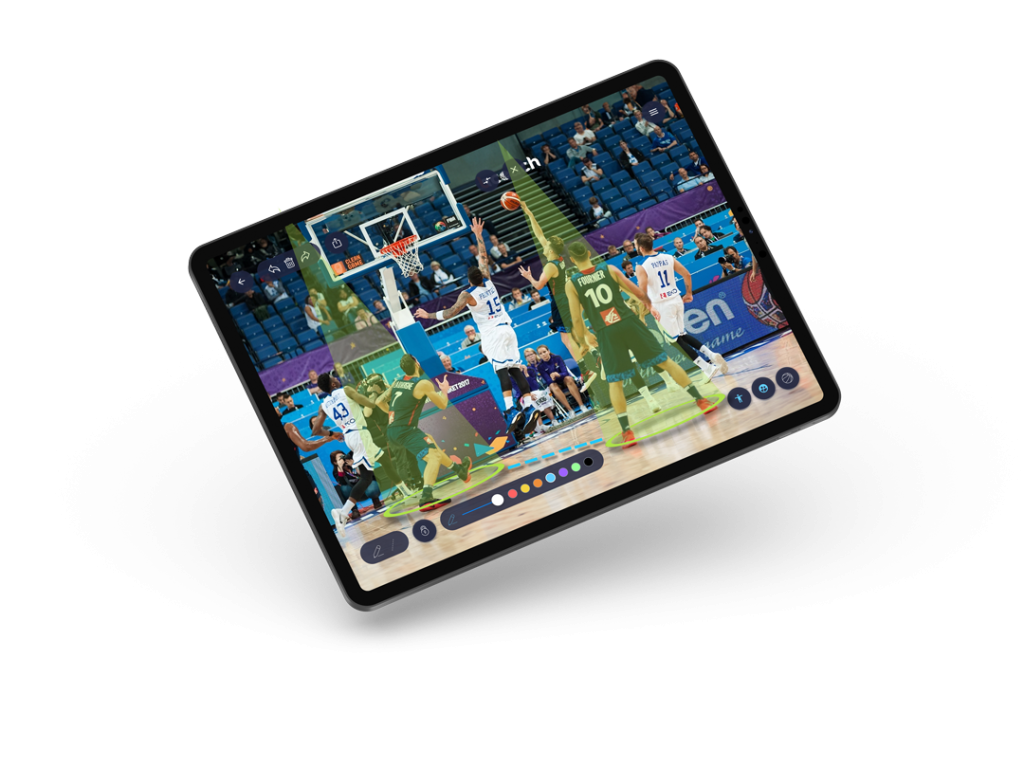
Bcoach Basket supports importing and working with images and video to explain tactical situations. Use a freeze frame to show spacing, a passing window, or the position of help defenders. Available editing controls may vary by app version.
Turn an idea into a practice drill
A beautiful diagram does not guarantee execution in a game. Translate the play into a drill with clear positions, constraints, and defensive reads. Explore our basketball drills guide to build progressions from simple situations to live play.
Example: teaching a side pick-and-roll
- Draw the ball handler at the wing, screener near the elbow, and spacing options on the weak side.
- Show the screen angle and two possible continuations: roll to the rim or pop to open space.
- Introduce a defender going under, switching, or trapping. Ask players where the advantage moves.
- Walk through the action without defense, then play two-on-two or three-on-three with live reads.
- Pause and review the decision rather than requiring everyone to follow one route.
Digital tactical board vs. a physical whiteboard
A physical board is quick during a timeout. A digital tool is better suited to preparing a collection of situations, adjusting diagrams before practice, and coordinating with drills. Many coaches use both; the right choice depends on whether you are teaching in the moment or preparing ahead of time.
A practical coaching workflow
Use a playbook diagram to explain the goal, choose one or two passing drills or defensive drills to isolate the decision, and end with live three-on-three or four-on-four. Review your team’s choices in the next session, not just whether the play was memorized.
Who is a basketball playbook app for?
Youth coaches can use basic floor maps to explain spacing and roles. Competitive and adult teams can add more complex reads, defensive coverages, and practice variations. The best diagram is the one players can understand and apply.
Need ready-to-teach examples? See our 10 simple basketball plays for coaches, then diagram and adapt them in your playbook.
Frequently asked questions
Can Bcoach Basket help me create practice drills?
Yes. In addition to its tactical board, Bcoach Basket provides drill design and session-planning tools, including animations and session sheets.
Do I need to use a digital board during games?
No. You can prepare material before practice and use whichever explanation method works best during a game.
Start building your next basketball practice
Diagram the action, explain how the defense changes it, and prepare a progression players can practice. Get started with Bcoach Basket.